Three invisible bytes at the start of a file decide whether your spreadsheet opens perfectly or explodes into gibberish — and most people have never heard of them. If you have ever opened a CSV in Excel to find Chinese, Arabic, Hindi, or even French characters replaced by question marks and strange symbols, while the same file looked flawless in Google Sheets or a text editor, you have met the byte order mark — the BOM. This CSV BOM explained walkthrough starts with the bytes themselves and works outward: what the BOM is, why Excel on Windows depends on it, when it actively causes harm, and exactly how to add or remove it with Excel, Python, and free text editors.
Here is the short version before we dive in. A CSV file is just text, and text needs an encoding — a rulebook mapping bytes to characters. UTF-8 is the universal modern rulebook, but Excel on Windows does not reliably detect it: without a hint, Excel reads UTF-8 files using your system’s legacy encoding (usually Windows-1252 in the US, UK, Canada, and Australia), and every non-English character turns to mojibake. The BOM is that hint: three bytes (EF BB BF) prepended to the file that say “this is UTF-8.” Add them and Excel behaves; leave them out and you get garbage. Simple — except that the same three bytes break database imports, confuse scripts, and show up as  in tools that read the file as legacy text. By the end of this guide you will know exactly when a BOM belongs in your CSV and when it must go.
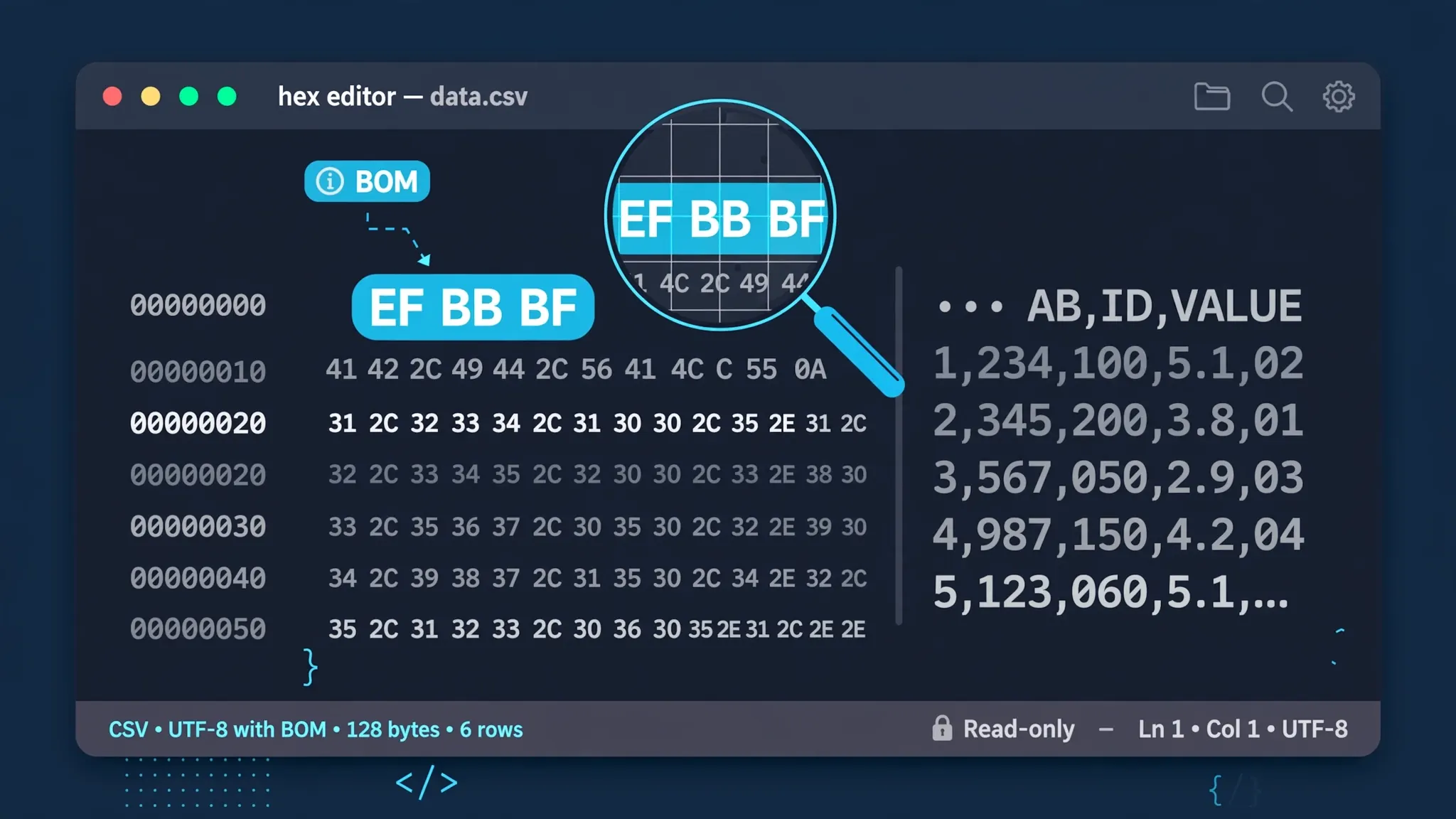
CSV BOM explained in 60 seconds
If you only have a minute, here is the whole story. BOM stands for byte order mark: the Unicode character U+FEFF placed at the very beginning of a text file to signal its encoding. In a UTF-8 file, that character is stored as the three bytes EF BB BF. Excel on Windows uses those bytes as a UTF-8 detector — with them, your é, ü, 中, ع, and दे characters render correctly; without them, Excel guesses your system’s legacy encoding and you get mojibake. That is the entire CSV BOM explained in one paragraph: three bytes that tell Excel “read me as UTF-8.”
The catch is that the BOM is a hint, not a standard requirement — and hints can misfire. Programs that already detect UTF-8 correctly (Google Sheets, modern text editors, Python’s utf-8 codec) may treat those three bytes as literal text, gluing an invisible character onto your first column header. Database loaders have choked on BOMs for decades. So the real skill is not “always add a BOM” or “never add a BOM” but knowing which consumer is reading your file. The rest of this guide builds that judgment call by call.
What is BOM in CSV files?
So what is BOM in CSV files, precisely? Technically, the byte order mark is the Unicode code point U+FEFF (zero-width no-break space), encoded in whatever encoding the file uses, and placed as the very first character of the stream. The name comes from its original job: in UTF-16 and UTF-32, where characters span multiple bytes, the BOM’s byte pattern reveals whether the file is big-endian or little-endian — hence “byte order mark.” UTF-8 has no byte-order ambiguity (it is always a byte stream in the same order), so in UTF-8 the BOM serves a different purpose: it is a signature announcing “this file is Unicode.” Wikipedia’s byte order mark article documents the full history and the per-encoding byte sequences.
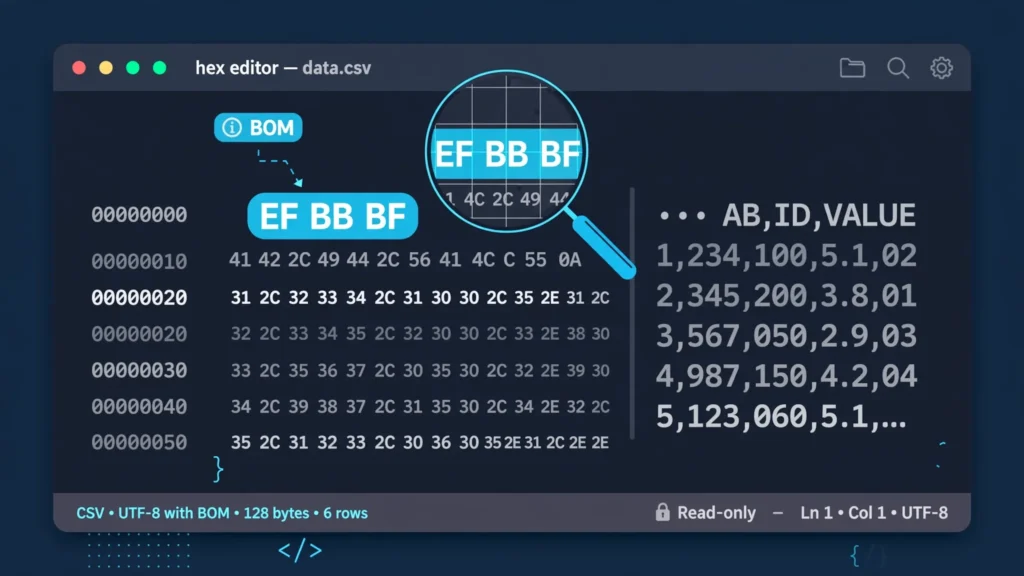
In practice, when people say “a CSV with BOM” they mean a UTF-8 CSV whose first three bytes are EF BB BF. You cannot see these bytes in Excel or Notepad — they are invisible by design — but a hex editor shows them plainly, as in the illustration above. The Unicode Consortium officially says a BOM is neither required nor recommended for UTF-8, which is why so many programs (Python’s default utf-8 codec, most Unix tools) neither write one nor expect one. Excel on Windows is the famous exception, and it is an exception that matters because Excel is where most business CSVs get opened.
One more technical note that clears up a common confusion: the BOM is not part of your data. It is metadata about the file, and well-behaved software strips it before parsing. The problems start with software that is not well-behaved in this specific way — it reads the BOM as data. That single design disagreement is the source of nearly every BOM horror story, from the  prefix to the phantom first column.
The  mystery, solved
Perhaps the most-searched BOM symptom is a CSV whose first cell starts with  — for example, id,name,city instead of id,name,city. Those three characters are exactly what the bytes EF BB BF look like when decoded as Windows-1252 (the Western European legacy encoding): EF→ï, BB→», BF→¿. Seeing  is diagnostic proof of two facts: your file has a BOM (good — it is UTF-8), and whatever opened it ignored the BOM and used the wrong encoding (bad). The fix is never to delete the characters by hand; it is to open the file as UTF-8. In Excel’s Text Import Wizard that means setting File Origin to 65001: Unicode (UTF-8) — a setting our guide to CSV file origin in Excel explains in full.
Why Excel needs the BOM (and most other programs don’t)
To understand why Excel is so needy about the BOM, you need a little history. For most of its life, Excel on Windows opened text files using the system’s ANSI code page — a legacy single-byte encoding like Windows-1252 in the US, UK, Canada, and Australia, or Shift-JIS in Japan. That default made sense in the 1990s when nearly every text file on a Windows machine used the local code page. UTF-8 barely existed as a mainstream format. Excel’s double-click-to-open path still carries that legacy assumption today: no BOM, no explicit import setting, and Excel falls back to the ANSI code page.
Most modern software took the opposite path. Web browsers, Google Sheets, VS Code, and Python all default to UTF-8 and only fall back to legacy encodings when forced — because on the modern internet, UTF-8 is the overwhelmingly dominant encoding (over 99% of web pages, per Wikipedia’s UTF-8 article). These programs do not need a BOM because their default guess is already right. Excel is the odd one out, still guessing “local legacy encoding” first. The BOM is the escape hatch: when Excel sees EF BB BF, it overrides its legacy default and reads the file as UTF-8.
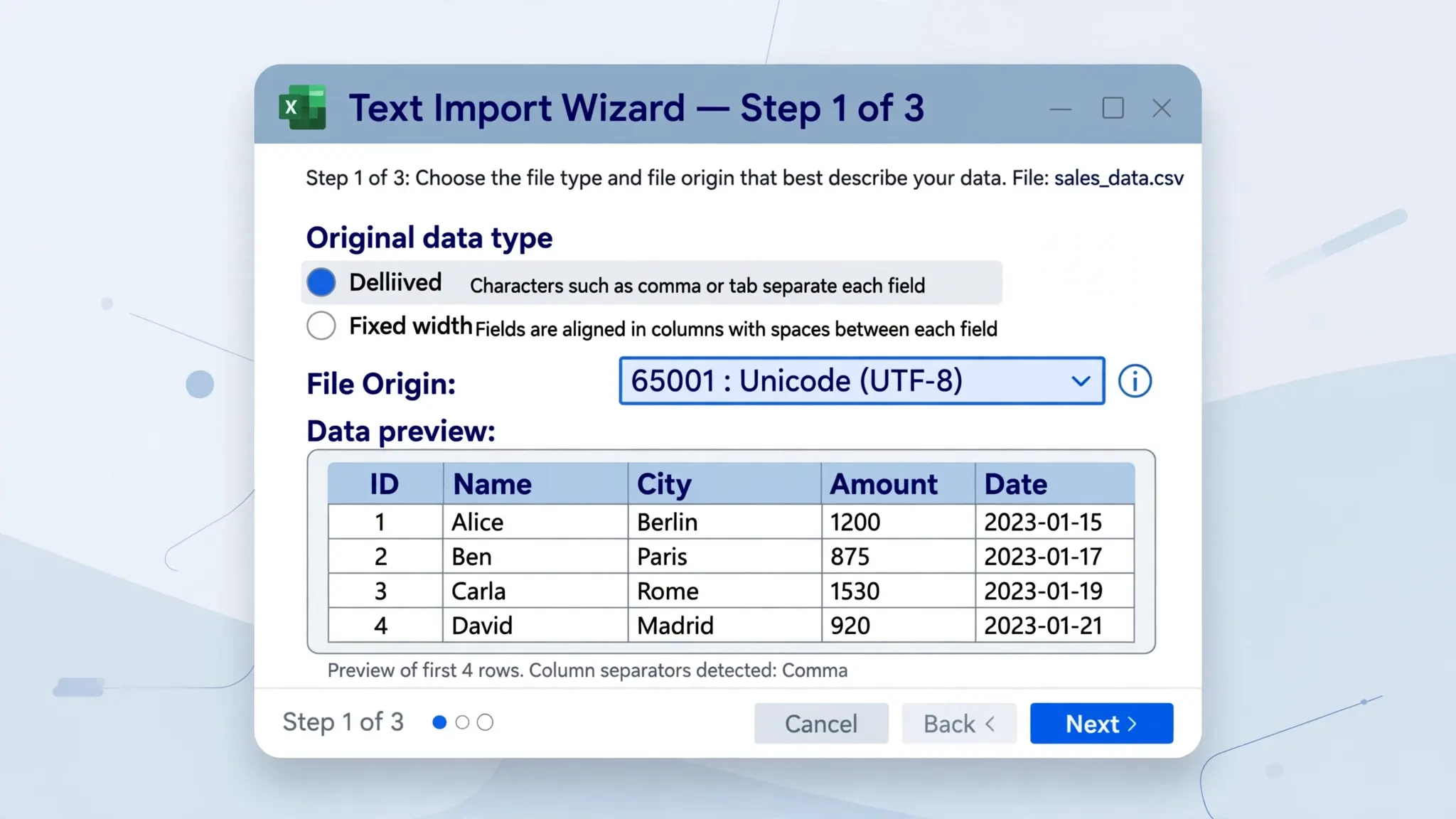
There is an important nuance: this is specifically about double-clicking a CSV or opening it via File › Open. If you import through the Text Import Wizard or Power Query’s Get Data › From Text/CSV and set the encoding explicitly, Excel does not need the BOM at all — you have told it the encoding directly. That is why experienced Excel users often say “just use the import wizard”: it sidesteps the whole detection problem. The BOM matters most for files opened casually, by colleagues who will never touch an import dialog.
UTF-8 with BOM vs without BOM: the practical differences
The UTF-8 with BOM vs without BOM decision changes behavior in at least four places, and the right choice depends entirely on who consumes the file.
Excel on Windows (double-click open). With BOM: UTF-8 detected, international characters correct. Without BOM: falls back to the ANSI code page; any character outside that code page becomes mojibake. This is the single strongest argument for including a BOM, and it is why Excel’s own “CSV UTF-8” save option writes one.
Google Sheets and modern editors. Both handle UTF-8 with BOM and without BOM identically — Sheets strips the BOM silently, VS Code and Notepad++ detect the encoding either way. The BOM is harmless here, which is why the “with BOM” default rarely causes complaints in browser-based workflows.
Programming languages and scripts. This is where “without BOM” wins. Python’s open(path, encoding="utf-8") does not strip a BOM — the invisible U+FEFF character lands in your first field name, so row["id"] mysteriously fails while the header clearly says id. (Python’s utf-8-sig codec exists precisely to handle this.) Similar gotchas affect JavaScript CSV parsers, R’s read.csv in some configurations, and shell pipelines that compare header strings.
Databases and ETL tools. Bulk loaders (SQL Server BULK INSERT, MySQL LOAD DATA, PostgreSQL COPY, Snowflake, BigQuery) vary: some strip the BOM, some ingest it as part of the first column name, and some reject the file. When a pipeline breaks, the BOM is always worth checking — it is invisible in every viewer but very visible to a byte-level parser. For a broader look at how UTF-8 and UTF-16 encodings differ at the byte level, see our UTF-8 vs UTF-16 CSV comparison.
How to add a BOM to a CSV file
Adding a BOM is a save-time operation: you rewrite the file with the three bytes prepended. The method depends on your tool.
- Excel (Save As): With the workbook open, go to File › Save As and choose CSV UTF-8 (Comma delimited) (*.csv) as the file type. Excel writes the BOM automatically. (The plain “CSV (Comma delimited)” option saves in the ANSI code page with no BOM — and silently destroys any character outside that code page, so avoid it for international data.)
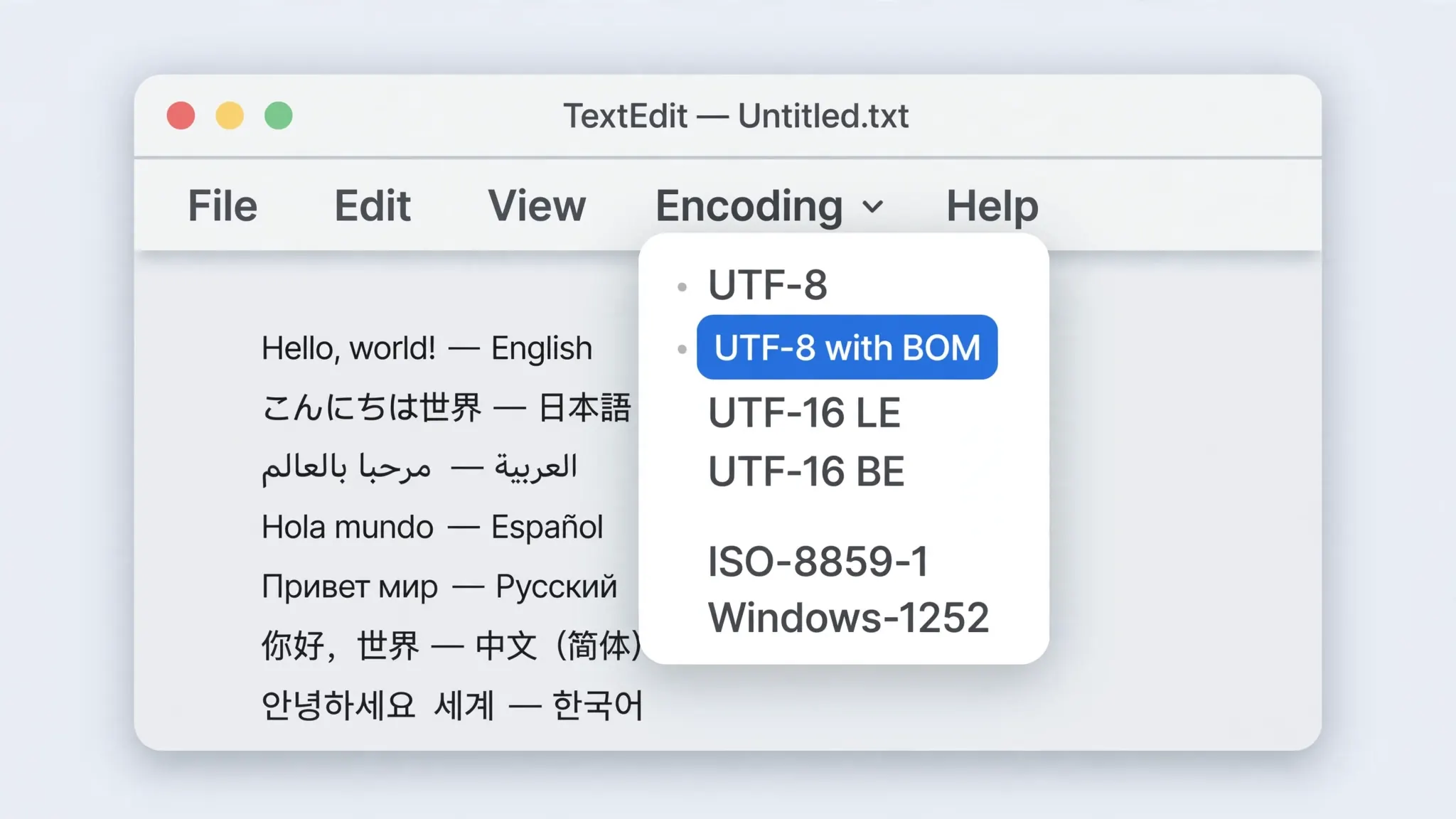
- Notepad++ (Windows): Open the CSV, go to Encoding › Convert to UTF-8-BOM, then save. Use Convert to rather than Encode in: “Convert” re-encodes the actual bytes, while “Encode in” only relabels them.
- VS Code: Click the encoding indicator in the status bar (bottom right), choose “Save with Encoding,” then select UTF-8 with BOM.
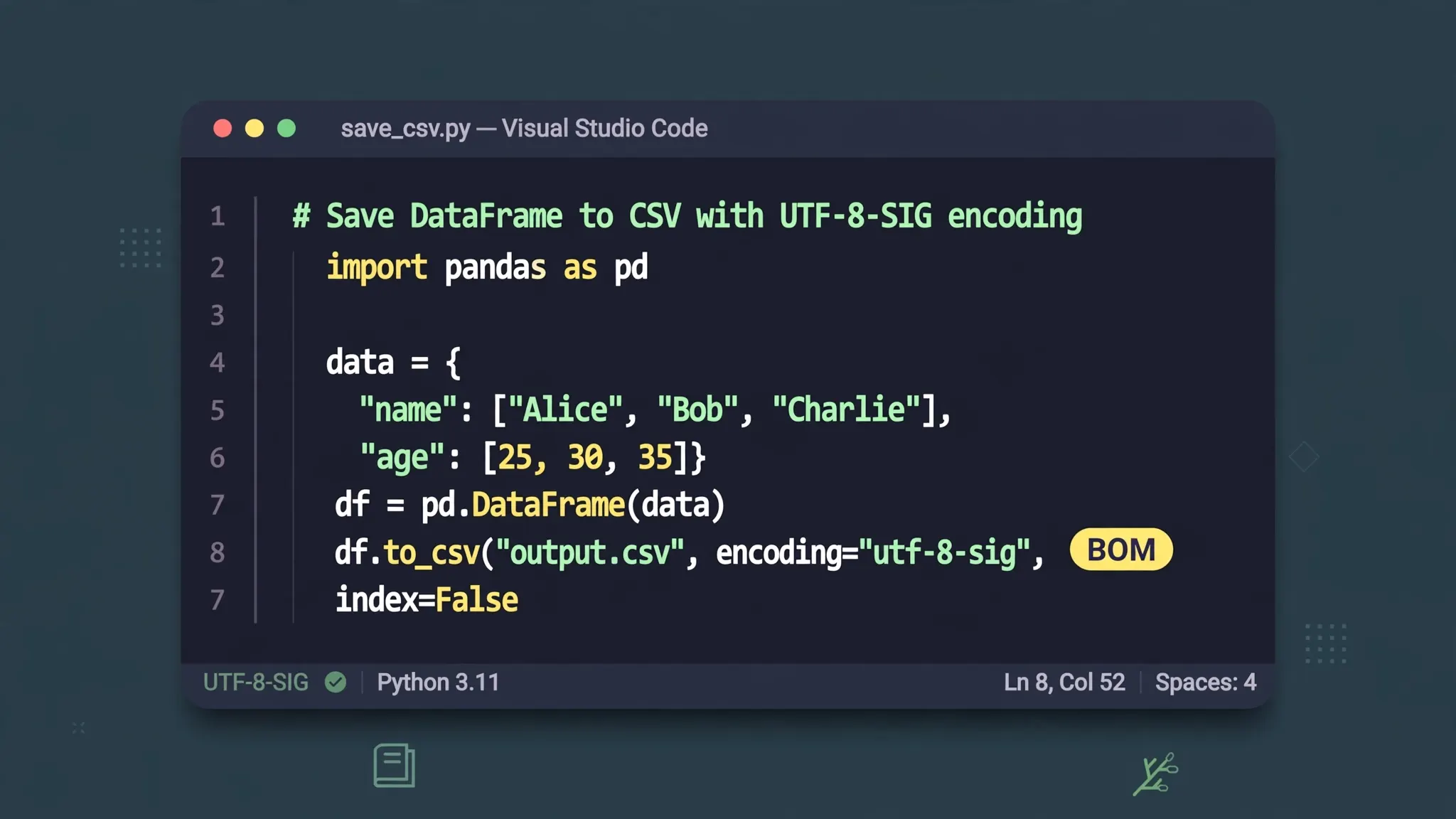
- Python: Write with
encoding="utf-8-sig"— see the dedicated section below. - Google Sheets: File › Download › Comma-separated values downloads as UTF-8 without a BOM. If your recipients use Excel on Windows, add the BOM afterward with one of the methods above, or route the file through the free CSV to Excel converter, which handles encoding detection for you.
How to strip a BOM when it causes trouble
Sometimes the BOM is the problem — a database loader rejecting the file, a script failing on the first header, a web app displaying a phantom character. Removing it is the mirror image of adding it:
- Notepad++: Encoding › Convert to UTF-8 (without BOM), then save.
- VS Code: Status bar › Save with Encoding › UTF-8 (the plain option writes no BOM).
- Python: Read with
encoding="utf-8-sig"(which strips a BOM if present) and write back withencoding="utf-8"(which never writes one). - Command line:
sed -i '1s/^\xEF\xBB\xBF//' file.csvremoves the three bytes from the start of the file in place. Verify withhead -c 3 file.csv | xxd— if the output is notef bb bf, the BOM is gone.
A word of caution: only strip the BOM when you have identified it as the cause. Stripping it from a file destined for Excel-on-Windows humans trades one problem (a parser quirk) for a worse one (mojibake for every recipient). Diagnose first — check whether the consumer actually mishandles the BOM — then act.
CSV BOM explained for Python users: the utf-8-sig codec
Python deserves its own section because it is where most CSVs are born — and where the BOM causes the most confusion. Python has two UTF-8 codecs, and choosing the wrong one is the root of half the BOM questions on the internet.
utf-8 is the plain codec: it never writes a BOM and never strips one. Writing a CSV with encoding="utf-8" produces a file Excel will misread (no BOM to trigger UTF-8 detection). Reading a BOM-carrying file with encoding="utf-8" leaves the invisible U+FEFF character glued to your first column name — the classic KeyError: 'id' when the header visibly says id.
utf-8-sig is the BOM-aware codec: on write it prepends EF BB BF; on read it strips a leading BOM if one exists (and behaves identically to utf-8 if there is none). That asymmetry makes it the safe default for CSV work:
df.to_csv("report.csv", index=False, encoding="utf-8-sig") # writes BOM → Excel-safe
pd.read_csv("report.csv", encoding="utf-8-sig") # strips BOM if present → header-safe
The practical rule for data pipelines: write with utf-8-sig when humans will open the file in Excel; read with utf-8-sig always, because it handles both cases gracefully. One caveat for the “no BOM for machines” rule: if a downstream system explicitly rejects BOMs (some legacy mainframe feeds, a few strict ETL validators), write with plain utf-8 instead — but only after confirming the rejection is real, not assumed. For teams standardizing on the CSV format itself, the RFC 4180 specification is the authoritative reference on how CSV files should be structured (though it stays silent on the BOM question).
BOM quirks in Google Sheets, databases, and web apps
Beyond Excel and Python, the BOM pops up in a few more places worth knowing about.
Google Sheets ignores the BOM entirely — uploads with or without one import identically, and downloads never include one. If your workflow is Sheets-centric, the BOM is simply irrelevant; the encoding battles described in this guide are an Excel-on-Windows phenomenon.
Databases are the danger zone. SQL Server’s BULK INSERT historically ingested the BOM into the first column; MySQL’s LOAD DATA INFILE can do the same depending on version and settings; PostgreSQL’s COPY is generally BOM-tolerant but client drivers vary. Cloud warehouses (BigQuery, Snowflake, Redshift) document their BOM handling, and it differs — check before you load, or strip the BOM in a preprocessing step and avoid the question.
Web apps and JavaScript parsers (like Papa Parse) usually handle the BOM correctly, but hand-rolled parsers often do not — a split-on-comma script will produce a first header of "\uFEFFid". If you maintain a CSV upload feature, add a BOM strip to your parser; it is three bytes of defensive code.
macOS and Linux tools (Numbers, LibreOffice, csvkit, awk) generally detect UTF-8 without a BOM and tolerate one when present — the Unix world standardized on BOM-less UTF-8 long ago. Files moving between Windows Excel users and Unix pipelines are exactly where the with/without decision matters most: BOM for the Excel leg, stripped for the pipeline leg, converted at the handoff.

And that is CSV BOM explained, end to end: three bytes, one detection hack for Excel, and a clear decision rule — BOM for humans on Windows Excel, no BOM for machines. Get that rule right and the most common CSV encoding headache in business simply disappears. If your file also carries the wrong encoding underneath the BOM question (legacy ANSI exports from older systems), our guide to CSV ANSI vs Unicode in Excel picks up where this one leaves off.
.xlsx in seconds.Frequently Asked Questions
What is BOM in CSV files?
The BOM (byte order mark) is the three-byte sequence EF BB BF placed at the very start of a UTF-8 text file. It signals to programs like Excel that the file is Unicode-encoded, so non-English characters display correctly instead of turning into mojibake.
Should a CSV file have a BOM or not?
Use a BOM when the CSV will be opened in Excel on Windows, because Excel relies on it to detect UTF-8. Skip the BOM when the CSV feeds databases, web apps, or Unix tools, where a leading BOM can corrupt the first column header or break parsers.
How do I save a CSV with UTF-8 BOM in Python?
Open the file with encoding=’utf-8-sig’ instead of ‘utf-8’. Python’s utf-8-sig codec writes the EF BB BF byte order mark at the start of the file, which makes Excel open the CSV with the correct encoding automatically.
Why does my CSV show  at the beginning?
The characters  are what the UTF-8 BOM bytes EF BB BF look like when a program reads the file as Windows-1252 instead of UTF-8. Open the file with UTF-8 encoding (or File Origin 65001 in Excel’s import wizard) and they disappear.
Can you give me the one-paragraph CSV BOM explained summary?
The BOM is three bytes (EF BB BF) at the start of a UTF-8 file that tell Excel on Windows to read the file as UTF-8 instead of a legacy encoding. Include it for human Excel users; strip it for databases, scripts, and pipelines that may misread it as data.
Does Google Sheets need a BOM in CSV files?
No. Google Sheets auto-detects UTF-8 reliably and ignores the BOM either way, so the BOM question mostly matters for Excel on Windows and for legacy desktop software.