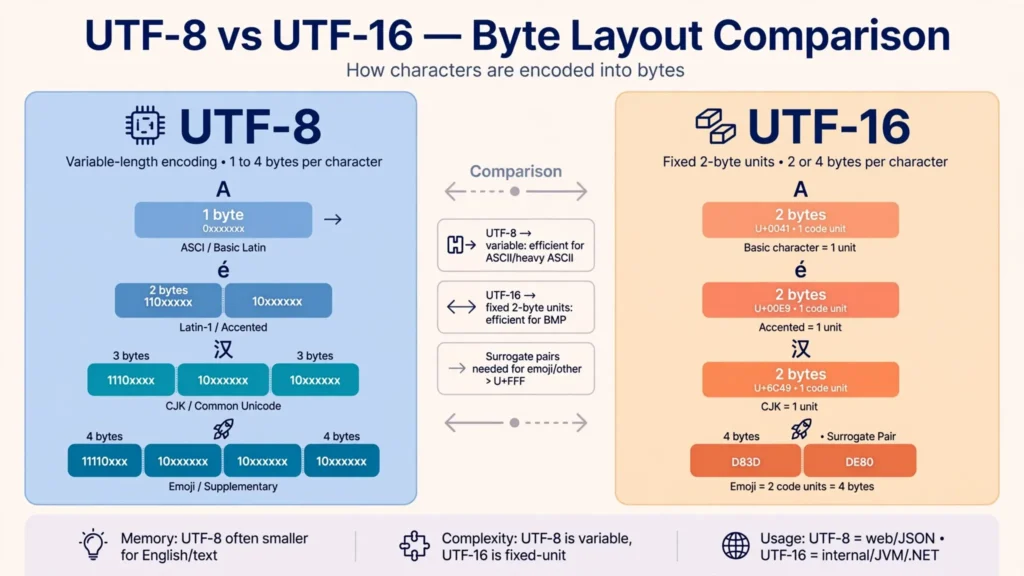
The UTF-8 vs UTF-16 debate confuses people because both encodings represent the exact same Unicode characters — your é, 中, and ع come through identically either way — yet the files they produce behave very differently in the real world. One is roughly half the size for typical business data, opens correctly in nearly every tool ever made, and is the default expectation of Excel, Google Sheets, databases, and the web. The other doubles your file size, depends on a byte order mark to be readable at all, and quietly breaks parsers that never learned to expect it. This guide compares the two encodings byte for byte, measures the real file-size difference on typical CSV data, explains what Excel actually prefers (including its confusing “Unicode” labels), and ends with a clear verdict you can apply in seconds.
A quick orientation before we go deeper: UTF-8 and UTF-16 are both encodings of Unicode — two different ways of turning the same character set into bytes. UTF-8 uses 1 to 4 bytes per character (1 byte for plain English text, more for other scripts); UTF-16 uses 2 or 4 bytes per character (2 bytes for almost everything in common use). Neither is “more Unicode” than the other. The practical question is never which is more correct — it is which one the software reading your CSV expects. And across the US, UK, India, Canada, and Australia, in just about every business workflow, the answer is UTF-8.

UTF-8 vs UTF-16 CSV at the byte level: how each encoding stores text
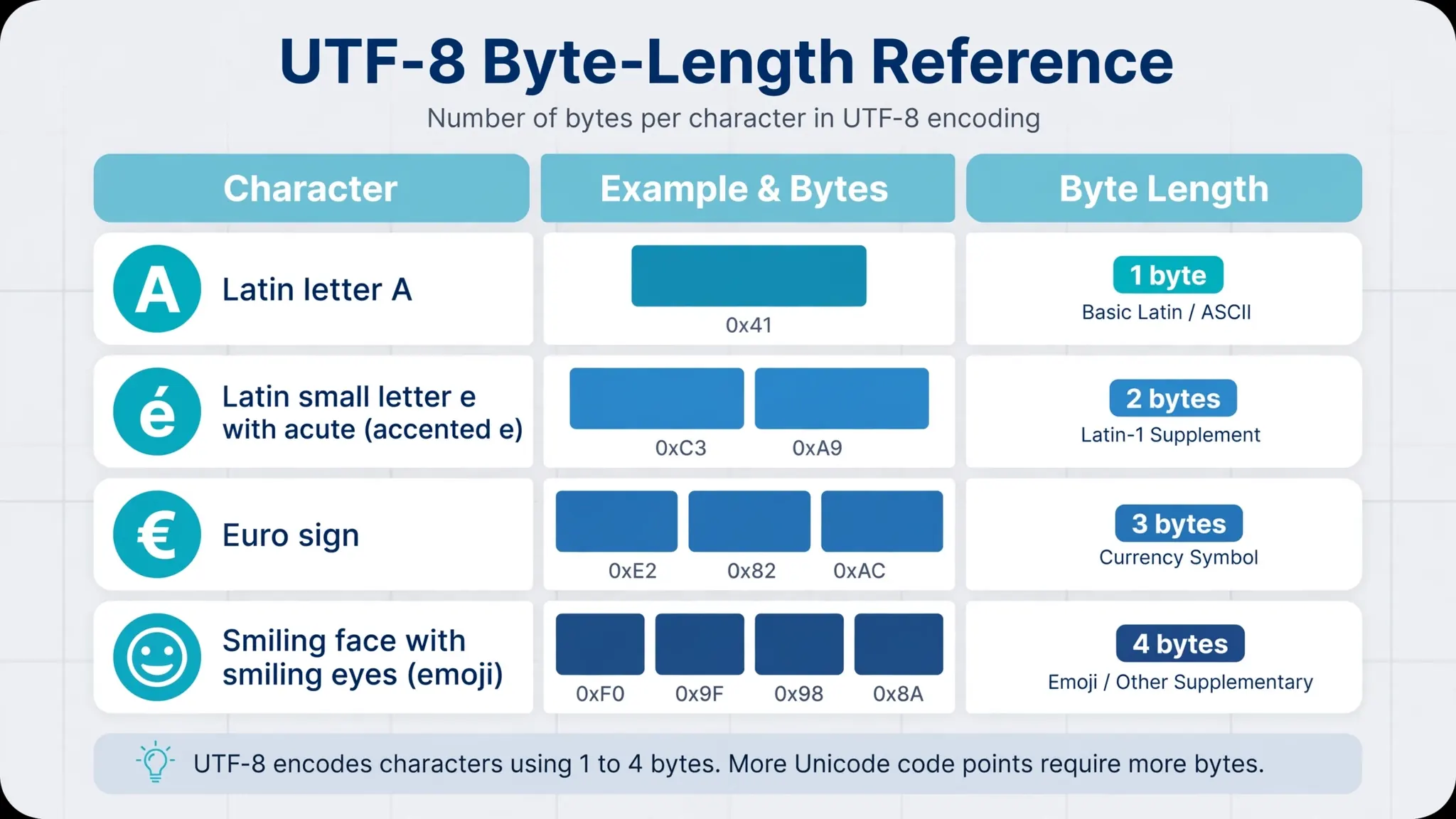
Start with the letter A. In UTF-8 it is a single byte: 41. In UTF-16 (little-endian, the Windows standard) it is two bytes: 41 00. The accented é is two bytes in UTF-8 (C3 A9) and two bytes in UTF-16 (E9 00) — a tie. The Chinese character 中 is three bytes in UTF-8 (E4 B8 AD) but only two in UTF-16 (2D 4E) — UTF-16 wins. An emoji like 😀 is four bytes in both. This per-character scorecard is the entire technical substance of the UTF-8 vs UTF-16 CSV question: UTF-8 is compact for ASCII-heavy text, UTF-16 is compact for text dominated by characters in the basic multilingual plane’s upper ranges.
Now think about what a CSV file actually contains. The structure of a CSV — commas, quotes, line breaks, digits — is 100% ASCII: one byte per character in UTF-8, two bytes per character in UTF-16. Even in a CSV full of Chinese product names, every comma, every quote, every row break, and every digit costs double in UTF-16. That structural overhead is why UTF-16 CSVs are bigger in practice far more often than the per-character scorecard suggests. A file that is 70% Chinese text by character count can still be larger in UTF-16 once you count the ASCII scaffolding holding it together.
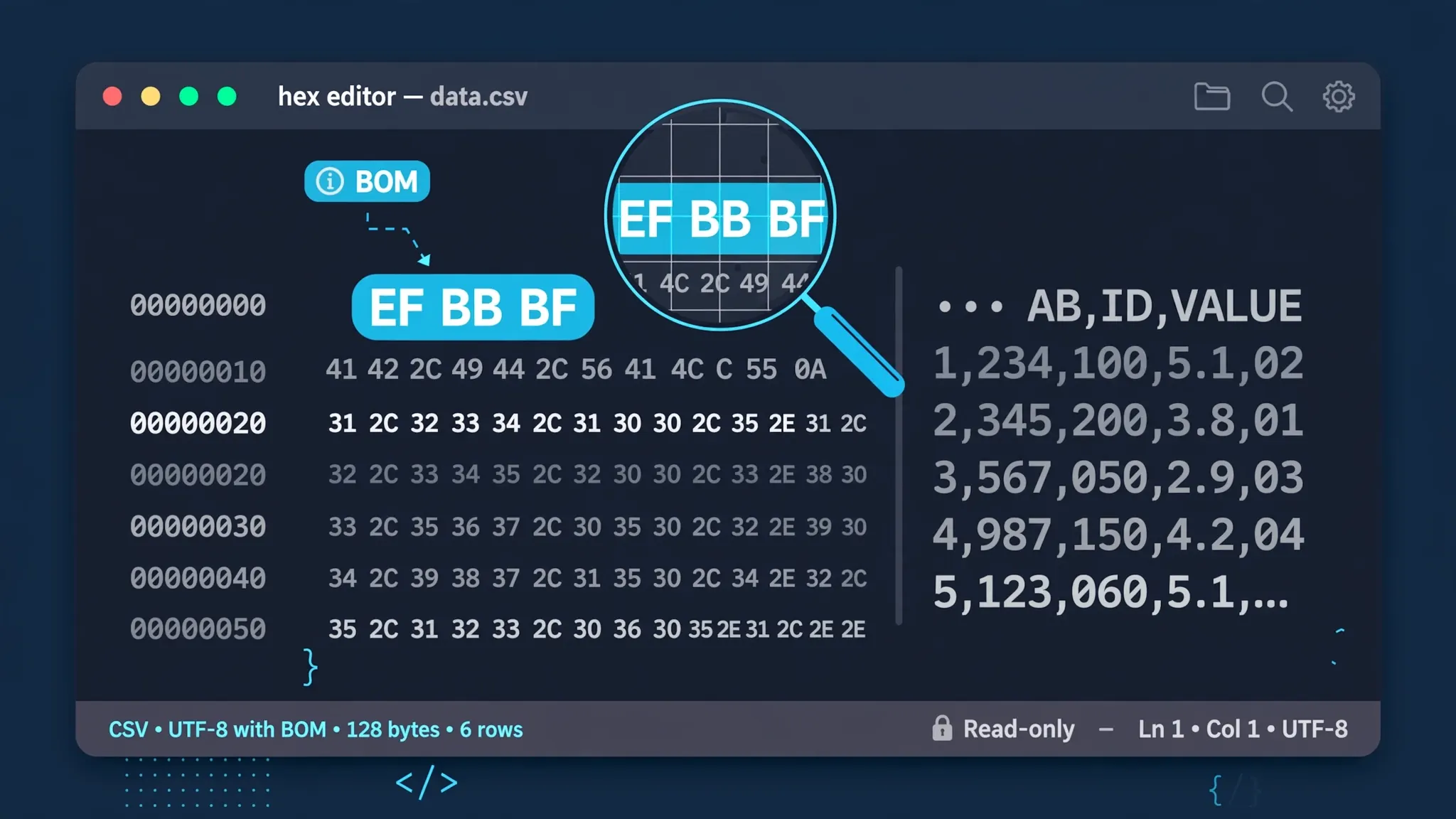
There is one more byte-level difference that matters enormously: endianness. UTF-8 is a byte stream — there is exactly one way to write it. UTF-16 encodes characters as 16-bit units, and those units can be stored big-endian or little-endian, so a UTF-16 file needs a byte order mark to declare which one it is (FF FE for little-endian, FE FF for big-endian). Strip that BOM and the file becomes ambiguous; read it with the wrong endianness and every character turns to garbage. UTF-8 files remain unambiguous with or without a BOM. That robustness gap — one encoding that degrades gracefully, one that fails catastrophically — explains much of UTF-8’s dominance, a story Wikipedia’s UTF-8 article tells in full.
File size compared: UTF-16 vs UTF-8 on real CSV data
Theory is nice; numbers are better. Take a typical 10 MB business CSV — say, an order export with English product names, customer names from the US, UK, and India, dates, and amounts. In UTF-8 it is roughly 10 MB. In UTF-16 it is roughly 20 MB, because nearly every character in it (letters, digits, commas, quotes, line breaks) doubles from 1 byte to 2. The UTF-16 vs UTF-8 file size ratio for Latin-script business data is essentially 2:1, always.
Now take a CSV of Chinese supplier data — product names and addresses in Chinese characters with ASCII commas and digits between them. In UTF-8, each Chinese character costs 3 bytes; in UTF-16, 2 bytes. If the file is 80% Chinese characters by byte count, UTF-16 might come out 15–25% smaller. But push that to a pure Chinese text file with no structure and UTF-16 wins by a full third. The crossover point — where UTF-16 starts winning — requires the overwhelming majority of characters to be 3-byte-in-UTF-8 CJK characters. Typical CSVs, with their heavy ASCII structure, rarely cross it.
Does file size even matter in 2026? For storage, rarely. For everything else, constantly: email attachment limits, upload timeouts to web apps, API payload caps, and the simple fact that a 2× file takes roughly 2× as long to parse. When a nightly ETL job processes hundreds of CSVs, the encoding tax compounds. The size argument alone settles the UTF-8 vs UTF-16 debate for most pipelines before compatibility even enters the picture.
What Excel actually prefers (and what “Unicode” means in its dialogs)
For Excel users, the UTF-8 vs UTF-16 CSV question has a clear answer: Excel prefers UTF-8, and Microsoft has been steering users there for years. The modern save option is labeled CSV UTF-8 (Comma delimited) — it writes UTF-8 with a BOM, which triggers correct detection when the file is double-clicked open. That is the option to use for any CSV leaving Excel.
The confusion comes from Excel’s older labels. In legacy Save As dialogs you may see “Unicode Text (*.txt)” — and “Unicode” here means UTF-16 little-endian, usually with tab delimiters rather than commas. The label dates from the late 1990s, when “Unicode” effectively meant 16-bit encodings and UTF-8 was obscure. If you have ever saved a file as “Unicode Text” and then wondered why it was twice as big, tab-separated, and unreadable in half your tools — now you know. It was UTF-16 all along. For a modern CSV, ignore that option entirely.
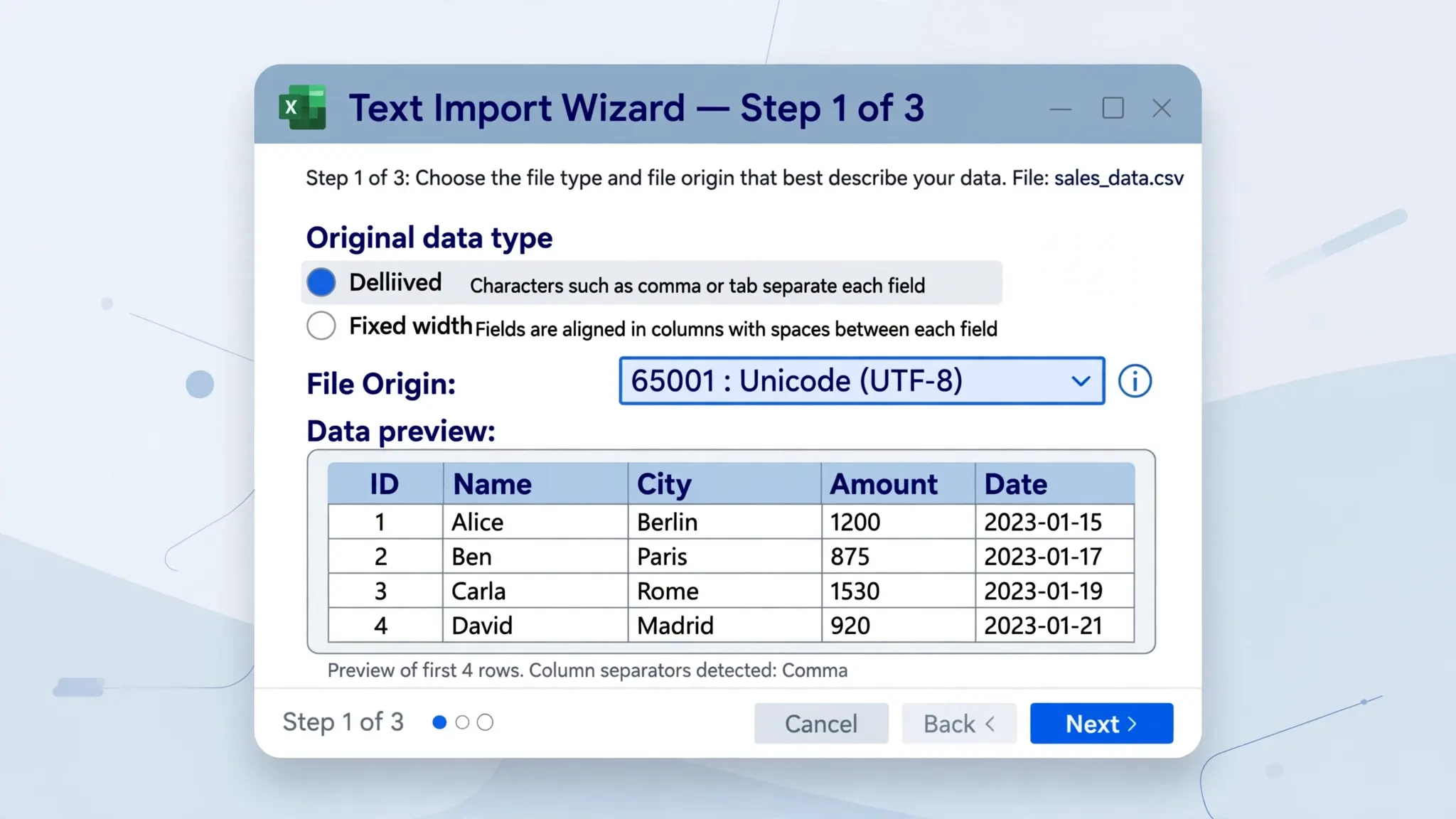
On the import side, Excel’s Text Import Wizard handles both encodings gracefully if you tell it which one the file uses. The File Origin dropdown lists them by code page number: 65001 : Unicode (UTF-8) for UTF-8, 1200 : Unicode for UTF-16 little-endian, and 1201 : Unicode (Big-Endian) for UTF-16 big-endian. (Our full guide to CSV file origin in Excel decodes every entry in that dropdown.) Power Query’s From Text/CSV dialog similarly offers both under its encoding selector. Excel the importer is bilingual; it is Excel the double-click opener that needs the BOM hint — and UTF-8’s BOM is the better-supported hint across the ecosystem.
Opening a UTF-16 CSV in Excel without mojibake
Sometimes you do not get to choose: a vendor, a legacy system, or an old tutorial hands you a UTF-16 CSV and Excel shows garbage. The fix depends on how you open it.
- Check the BOM first. A healthy UTF-16 file starts with
FF FE(little-endian) orFE FF(big-endian). If those bytes are missing — stripped by an email gateway or a careless script — Excel cannot detect the encoding and guesses wrong. Re-add the BOM or convert the file (next section) rather than fighting the open dialog. - Use the Text Import Wizard. Open a blank workbook, go to Data › From Text/CSV (or Data › Get Data › From File › From Text/CSV), select the file, and set File Origin to
1200 : Unicodefor little-endian or1201 : Unicode (Big-Endian)for big-endian. The preview pane shows you immediately whether the text decodes correctly. - Try Power Query. In the From Text/CSV dialog, the encoding dropdown (sometimes labeled “File Origin”) offers UTF-16 options with a live preview. Power Query is more forgiving than the legacy wizard about missing BOMs.
- When in doubt, convert first. Rather than wrestling import settings every time, convert the UTF-16 file to UTF-8 once (see below) and work with the UTF-8 version going forward.
A diagnostic shortcut: if a UTF-16 file opened as the wrong encoding shows every other character as a box or a Chinese-looking glyph with spaces between Latin letters (S a m p l e), you are looking at 2-byte units read as 1-byte characters — the classic signature of a UTF-16 file decoded as ANSI. The FF FE / FE FF BOM bytes are documented alongside the UTF-8 BOM in Wikipedia’s byte order mark article and in our own CSV BOM explained guide.
Converting between UTF-8 and UTF-16 CSV files
Conversion is lossless in both directions for valid text — both encodings cover all of Unicode, so no character is ever lost. Only the byte representation changes.
- Python (most reliable):
open('in.csv', encoding='utf-16').read()then write withencoding='utf-8-sig'for Excel-friendly UTF-8 with BOM, or plain'utf-8'for BOM-less. Reverse the encodings to go the other way. Python auto-detects UTF-16 endianness from the BOM. - Notepad++: Open the file, then Encoding › Convert to UTF-8-BOM (or UTF-8). To produce UTF-16: Encoding › Convert to UCS-2 LE BOM (Notepad++’s name for UTF-16 little-endian).
- Excel: Open the file correctly (previous section), then File › Save As › CSV UTF-8 (Comma delimited). Excel always writes a BOM with this option — ideal for recipients on Windows.
- Command line:
iconv -f UTF-16 -t UTF-8 in.csv > out.csvon macOS/Linux converts cleanly, BOM included or stripped with the-t UTF-8vs-t UTF-8handling of your iconv build; verify the first bytes withxxd | head -1.
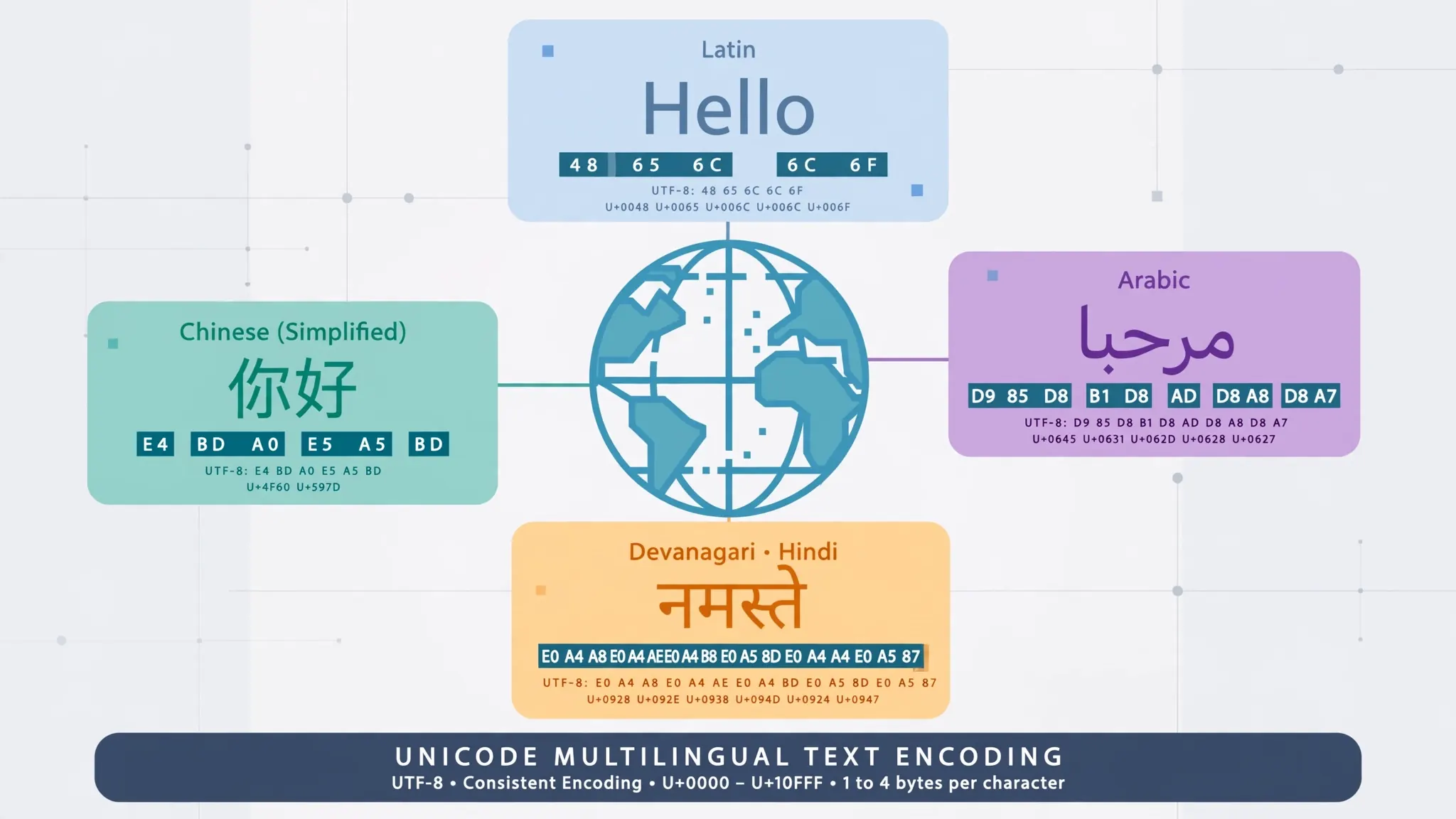
One conversion caveat: never convert by “relabeling.” Opening a UTF-16 file in an editor and choosing “Encode in UTF-8” (as opposed to “Convert to UTF-8”) keeps the old bytes and only changes the label — producing a file that is corrupt in a particularly confusing way. Always convert (rewrite the bytes), never just relabel. After converting, spot-check a few non-ASCII cells before sending the file on.
UTF-16’s hidden traps: endianness, double size, and weak tool support
Even when UTF-16 is technically the smaller encoding for your data, it carries structural disadvantages that bite in production.
Endianness fragility. A UTF-16 file without its BOM is ambiguous — and BOMs get stripped more often than you would think: by email gateways, by “helpful” text processing, by concatenation scripts that drop everything before the first data row. A BOM-less UTF-16 file is a coin flip; a BOM-less UTF-8 file is still perfectly readable. In data pipelines, that asymmetry matters.
Tool support is thinner. The Unix world standardized on UTF-8 decades ago. Command-line tools (grep, awk, sed, cut) operate on bytes and assume single-byte line endings — feed them UTF-16 and line breaks become invisible because 0A 00 is not the byte 0A they search for. Many CSV parsers in JavaScript, Go, and older Java libraries handle UTF-16 poorly or not at all. UTF-8, by contrast, works everywhere because it was designed to: ASCII bytes never appear inside multi-byte sequences, so byte-oriented tools keep working.
Double memory and bandwidth. Parsers allocate buffers proportional to file size; network transfers bill by the byte. A 2× file is a 2× cost on every read, every upload, every backup — for zero additional information.
Silent corruption modes. The nastiest UTF-16 failure is the partial one: a tool reads the file as UTF-8, and because UTF-16’s 00 bytes are valid (if odd) UTF-8, you get output that looks almost right — Latin letters separated by spaces, CJK characters where digits should be — instead of an honest error. UTF-8 misdecoded as UTF-16 fails loudly. Loud failures get fixed; silent corruption gets shipped.
UTF-8 vs UTF-16 CSV in Google Sheets, databases, and code
How the two encodings behave once they leave Excel is the rest of the story.
Google Sheets accepts both without complaint — File › Import auto-detects UTF-8 and UTF-16 (via BOM) — but everything Sheets exports comes out as UTF-8 without a BOM. A UTF-16 CSV that passes through Google Sheets silently becomes UTF-8, which is usually an improvement but can surprise a downstream system that expected UTF-16. If your pipeline includes a Sheets step, treat UTF-8 as the de facto output encoding.
Databases overwhelmingly expect UTF-8. PostgreSQL’s COPY, MySQL’s LOAD DATA, and the bulk loaders of BigQuery, Snowflake, and Redshift all default to UTF-8; several reject UTF-16 outright or require an explicit encoding parameter that someone will forget at 2 AM. If a vendor delivers UTF-16, convert at the boundary — a one-line Python or iconv step in the ingestion script — rather than teaching every downstream consumer a second encoding.
Programming languages split along age lines. Python, Go, Rust, and JavaScript handle both via explicit codec names (utf-16 auto-detects endianness from the BOM). Older Java and .NET code often defaults to UTF-16 internally, which is precisely why so many legacy Windows systems emit UTF-16 CSVs in the first place — the encoding leaked out of the runtime’s string representation. When you see a UTF-16 CSV in the wild, a .NET or Java exporter is the usual suspect.
The recurring-vendor playbook. If the same supplier sends you UTF-16 every week, stop converting by hand. A Power Query that imports with File Origin 1200 and loads to a table, or a five-line Python script using encoding="utf-16" on read and "utf-8-sig" on write, turns the weekly chore into a scheduled task. Document the conversion in the pipeline’s README so the next person understands why the encoding changes at that step.
The verdict: which encoding for which job
After the full comparison above, the decision tree is short:
Default to UTF-8 (with BOM for Excel-on-Windows recipients). This covers essentially all business CSVs: exports, imports, reports, feeds, and anything a human will double-click open. It is smaller for Latin-script data, universally supported, robust without a BOM, and what every modern tool expects. When someone says “save as Unicode CSV” and means well, this is almost certainly what they actually want.
Consider UTF-16 only when a specific legacy system demands it — some older Windows applications, certain SQL Server bulk-load configurations, and a handful of government data portals still specify UTF-16 (usually as “Unicode”). In those cases, keep the BOM, document the encoding for the recipient, and convert to UTF-8 for every other leg of the journey.
Never use UTF-16 “just because.” There is no quality advantage — both encodings represent identical characters. The choice is purely logistical, and the logistics favor UTF-8 in every dimension except raw byte count for CJK-heavy text.
If this encoding comparison has you rethinking your CSV pipeline, two companion guides go deeper on the adjacent questions: CSV BOM explained covers the byte order mark both encodings use, and CSV ANSI vs Unicode in Excel tackles the legacy single-byte encodings that still haunt Windows exports.
Frequently Asked Questions
Which is better for CSV files: UTF-8 or UTF-16?
UTF-8 is better for almost every CSV use case. It produces smaller files for Latin-script data, is detected reliably by virtually all software, and is what Excel, Google Sheets, databases, and web tools expect. UTF-16 only wins for files dominated by East Asian text where it can be marginally smaller.
Does Excel prefer UTF-8 or UTF-16 CSV?
Excel handles both, but UTF-8 is the safer choice: Excel’s ‘CSV UTF-8’ save option writes a BOM that triggers correct detection on double-click open, while UTF-16 files rely on their BOM and break more tools downstream.
Why is my UTF-16 CSV twice as big?
UTF-16 uses a minimum of 2 bytes per character, while UTF-8 uses 1 byte for ASCII characters (letters, digits, commas, line breaks). Since CSV structure is almost entirely ASCII, a UTF-16 CSV is roughly double the size of the same data in UTF-8.
What does “Unicode” mean in Excel’s Save As dialog?
In older Excel Save As dialogs, ‘Unicode Text’ means UTF-16 little-endian (usually tab-delimited .txt). It is a legacy label from when Unicode effectively meant 16-bit; for modern CSV work, choose ‘CSV UTF-8’ instead.
How do I convert a UTF-16 CSV to UTF-8?
In Python: read with encoding=’utf-16′ and write with encoding=’utf-8-sig’. In Notepad++: Encoding › Convert to UTF-8-BOM. In Excel: open the file, then Save As › CSV UTF-8. For a no-install option, the free CSV to Excel converter detects the encoding automatically.
Can UTF-16 cause mojibake in Excel?
Yes, when the BOM is missing or stripped. Without its byte order mark, Excel may read a UTF-16 file as a single-byte encoding, producing Chinese-looking characters or garbage. Always keep the BOM on UTF-16 files.