MicroG APK vs Google Play Services: Which Is Better?
Most Android phones ship with Google Play Services quietly running in the background, handling everything from push notifications to location. You rarely choose it — it is just there. MicroG is the alternative people install when they do want a choice. It promises the core functions apps expect, without the weight and constant data collection of Google’s version.
So in a straight MicroG APK vs Google Play Services comparison, which is actually better? It depends on what you value. If you want every app to work without thinking about it, Google wins. If you want a lighter, more private phone and accept a few rough edges, MicroG has a strong case.
What is each one, really?
Google Play Services is Google’s proprietary framework — not the Play Store itself, but a background layer apps call for maps, location, push messages, sign-in, and dozens of other functions. New features arrive there first, and developers can assume it is present on almost every certified phone.
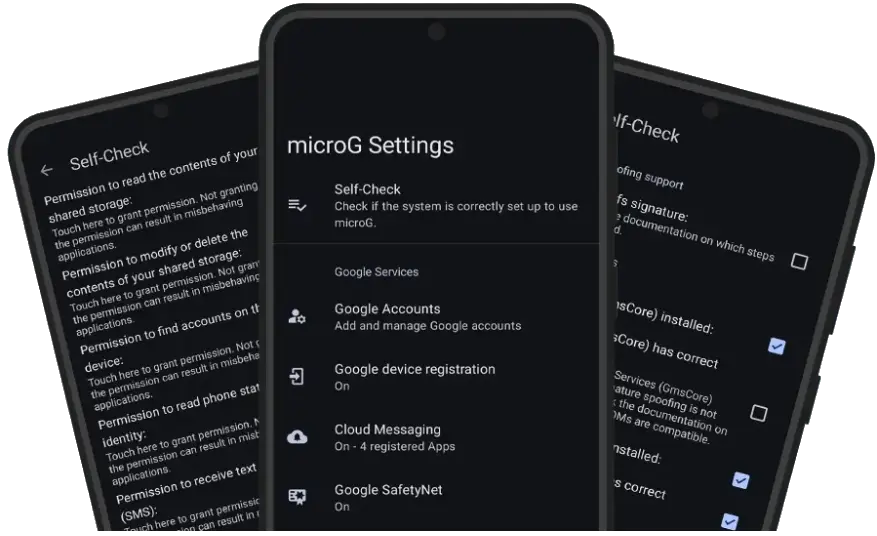
MicroG, built around a component called GmsCore, is a free and open-source reimplementation of those same APIs. Independent developers studied how apps talk to Play Services and built a replacement that answers many of the same requests. When an app asks for your location or wants to register for push notifications, MicroG can respond in a compatible way — without Google’s code on your phone.
If you want the deeper plain-English version first, our guide where MicroG APK is explained walks through how that translation works step by step. The key point here is simple: MicroG is not a copy of Google’s software and it is not made by Google. It is a separate project aiming for compatibility, and that difference explains both its strengths and its gaps.
How do they compare, feature by feature?
Looking at the two side by side makes the trade-off much clearer than vague claims about being “better” or “worse.”
| Feature | MicroG | Google Play Services |
|---|---|---|
| Footprint | Small — tens of megabytes, modular components | Large — hundreds of megabytes with updates and data |
| Privacy | Open source, minimal data collection, features can be disabled | Closed source, tied closely to your Google account and activity |
| Push notifications | FCM supported for many apps that use Firebase Cloud Messaging | FCM native, most reliable delivery |
| Location | UnifiedNlp providers, can work without Google location services | Fused location from Google, very accurate and fast |
| App compatibility | Good for many everyday apps, gaps with Play Integrity and some Google APIs | Best possible — apps are built and tested against it |
| Battery | Usually lighter, fewer background wake-ups | Heavier, known battery drain on some devices |
The pattern in MicroG APK vs Google Play Services is consistent: MicroG does the essentials with far less overhead, while Google does everything but asks for more storage, permissions, and trust. You are trading completeness for control.
What are the privacy differences?
This is where the gap is widest. Play Services is deeply connected to Google’s ecosystem. Even if you never open a Google app, the framework can report device information, app usage signals, and location history depending on your settings. You can turn some of this off, but you cannot inspect the code, remove the parts you dislike, or run it without accepting Google’s terms.
MicroG takes the opposite approach. Its code is public, so researchers can check what it actually does. It does not require a Google account for basic operation, though you can optionally sign in if an app needs it. Features such as push messaging and location are separate pieces you can enable only if you want them. If you never use an app that needs FCM, that component simply sits idle.
That does not make a phone automatically anonymous — apps and networks can still track you — but removing one large, always-on data collector is a meaningful step. If privacy is your deciding factor, also read our honest assessment of whether MicroG is safe.
Which is better for performance and battery life?
On older or budget phones, the difference can be obvious within a day. Play Services keeps multiple processes alive, checks in regularly, and grows over time as it caches data for different APIs. On a phone with 2 or 3 GB of RAM, that background weight competes directly with the apps you are actually trying to use.
MicroG is deliberately lean. GmsCore and its companions use less storage, start faster, and wake the phone less often. Users who move to a custom ROM with MicroG commonly report smoother multitasking and noticeably better standby battery — the phone loses less charge overnight because fewer services are phoning home.
Be realistic, though: MicroG removes a steady background burden, it does not fix drain from a bright screen or one badly behaved app. On a modern flagship you may notice privacy more than speed; on a five-year-old phone, the performance gain alone can justify the switch.
What are the honest compatibility limits?
Here is the part no honest MicroG APK vs Google Play Services comparison can skip. Some apps simply will not work properly without official Google services, and MicroG cannot change that.
Banking, payment, and government apps are the biggest problem area. Many of them check your device using SafetyNet’s successor, Play Integrity, and refuse to run if they cannot verify a certified Google environment. Some ordinary apps also depend on newer APIs that MicroG has not implemented yet, or on features like certain in-app map views and casting options that behave inconsistently.
There is also a setup hurdle: most ROMs need signature spoofing support for a full installation. Many custom ROMs include it, stock ROMs usually do not — which is why MicroG is most common on custom ROMs, Huawei devices without Google services, and alongside YouTube ReVanced.
If an essential app fails, there is no clever setting that will always save you. That is why our roundup of MicroG alternatives is worth reading too — for some people, keeping a second device or a separate work profile with official services is the practical compromise.
MicroG APK vs Google Play Services: which should you choose?
In MicroG APK vs Google Play Services, choose Google Play Services if you want maximum compatibility with zero tinkering. If your banking and work apps must work every time, you rely on Google Pay or Wear OS, and you are comfortable with Google’s data practices, the default setup is the sensible choice.
On the microg vs google play services question, choose MicroG if you are installing a custom ROM, reviving an older phone, using a device without Google services, or deliberately reducing how much data your phone sends out. You will get push notifications, location, and sign-in for a large share of everyday apps, with a smaller footprint and far more control — as long as you accept that a minority of apps, especially financial ones, may refuse to cooperate.
A good test is this: list the five apps you cannot live without. Check reports from other MicroG users for each one. If all five are known to work, the switch is low risk. If two are banking apps with strict integrity checks, think carefully. You can explore the project further from our homepage and see exactly what is included on the download page before you commit to anything.
Frequently Asked Questions
Is MicroG a full replacement for Google Play Services?
No — and that is the honest starting point for MicroG APK vs Google Play Services. MicroG covers the most commonly used Play Services APIs, including push notifications, location and sign-in for many apps, but it does not cover everything. Apps that depend heavily on Play Integrity or newer Google features may not work fully.
Will I save battery by switching to MicroG?
Many users do see better battery life because MicroG is much smaller and runs fewer background processes than Play Services. The exact gain depends on your phone, ROM and which Google apps you were using before.
Can I use MicroG and Google Play Services at the same time?
Not normally on the same device profile. Both try to provide the same services to apps, so you choose one approach for that device. Most people install MicroG on a custom ROM that does not include Google apps.
Do banking apps work with MicroG?
Some do and some do not. Banking and payment apps that check for SafetyNet or Play Integrity often refuse to run without official Google services. Test your essential apps first and keep a backup plan if banking is critical.
Which is more private in MicroG APK vs Google Play Services?
Yes, in design. MicroG is open source, collects far less data and lets you choose which features to enable. You can inspect its code, disable components and avoid a Google account for basic use in many setups.
Get MicroG
Ready to try the lighter option? Start on our homepage, check requirements on the download page, and grab the file: Download MicroG APK — the latest version available on this site. Back up your data first and confirm your ROM supports signature spoofing.
3 thoughts on “MicroG APK vs Google Play Services: Which Is Better?”
Comments are closed.